Decorative display font with integrated eye motifs
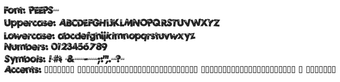
Peeps, from Fontalicious, is a decorative display font that gives text a playful, cartoon-like presence for short headlines and themed artwork. The font emphasizes visual personality through rounded, organic letterforms and eccentric curves, making words appear lively and emblematic. Its design targets graphic designers, illustrators, and hobbyists working on children's materials, party invitations, comic-style logos, or retro-themed digital art, where overt decoration is the primary intent.
What effect does Peeps apply to letterforms?
Peeps turns ordinary text into a cartoon-strip aesthetic by embedding stylized facial elements inside each glyph. The typeface uses rounded, organic shapes and integrated eye motifs so letters read as characters rather than neutral strokes, producing continuous visual flow across words. That living, animated quality suits display compositions where typographic ornamentation replaces separate icons or illustrations.
How much control do designers have over its appearance?
The font provides control through size, color, and spacing inside the host application, but the glyph artwork itself is fixed: each character carries its own facial detail. The package includes a full set of uppercase and lowercase letters, numbers, and basic symbols, so designers can compose headlines without importing external icons, but they cannot alter the internal motifs except by editing outlines in a vector editor.
Is Peeps appropriate for small text or continuous reading?
The design is optimized for large display use rather than small body copy: the decorative details rely on visible stroke area and can reduce legibility when scaled down. The font contains roughly 95–96 basic Latin characters, so extended-language support is limited. Its vector-based outlines scale well for print and high-resolution screens, yet the decorative complexity favors short lines and title treatments.
How easy is installation and cross-application use?
Peeps is distributed as a standard TrueType (.ttf) file, which installs like other desktop fonts and loads into typical design programs. It works in common applications that accept custom fonts; examples include:
- Microsoft Word and other office suites
- Adobe Photoshop and image editors
- Vector and layout tools that read .ttf files
Peeps is a distinctive decorative choice for selective display use
Originally released in 1998 and downloaded over 200,000 times on community sites, Peeps offers a recognisable 1990s decorative voice that designers reach for when projects call for overt whimsy. Use it sparingly in titles or branding where ornament is intentional; pair it with neutral text faces for readable body copy to avoid visual clutter in longer layouts.